EnjoY | Database Research And Development

Thursday, January 21, 2021

SQL Server : Data Modelling: Conceptual, Logical, Physical Data Model Types.

This article is half-done without your Comment! *** Please share your thoughts via Comment ***

What is Data Modelling?

Data modeling (data modelling) is the process of creating a data model for the data to be stored in a database. This data model is a conceptual representation of Data objects, the associations between different data objects, and the rules. Data modeling helps in the visual representation of data and enforces business rules, regulatory compliances, and government policies on the data. Data Models ensure consistency in naming conventions, default values, semantics, security while ensuring quality of the data.

Data Model

The Data Model is defined as an abstract model that organizes data description, data semantics, and consistency constraints of data. The data model emphasizes on what data is needed and how it should be organized instead of what operations will be performed on data. Data Model is like an architect's building plan, which helps to build conceptual models and set a relationship between data items.

The two types of Data Modeling Techniques are

  1. Entity Relationship (E-R) Model
  2. UML (Unified Modelling Language)

We will discuss them in detail later.

This Data Modeling Tutorial is best suited for freshers, beginners as well as experienced professionals. In this data model tutorial, data modeling concepts in detail-

  • Why use Data Model?
  • Types of Data Models
  • Conceptual Data Model
  • Logical Data Model
  • Physical Data Model
  • Advantages and Disadvantages of Data Model

Why use Data Model?

The primary goal of using data model are:

  • Ensures that all data objects required by the database are accurately represented. Omission of data will lead to creation of faulty reports and produce incorrect results.
  • A data model helps design the database at the conceptual, physical and logical levels.
  • Data Model structure helps to define the relational tables, primary and foreign keys and stored procedures.
  • It provides a clear picture of the base data and can be used by database developers to create a physical database.
  • It is also helpful to identify missing and redundant data.
  • Though the initial creation of data model is labor and time consuming, in the long run, it makes your IT infrastructure upgrade and maintenance cheaper and faster.

Types of Data Models

Types of Data Models: There are mainly three different types of data models: conceptual data models, logical data models, and physical data models, and each one has a specific purpose. The data models are used to represent the data and how it is stored in the database and to set the relationship between data items.

  1. Conceptual Data Model: This Data Model defines WHAT the system contains. This model is typically created by Business stakeholders and Data Architects. The purpose is to organize, scope and define business concepts and rules.
  2. Logical Data Model: Defines HOW the system should be implemented regardless of the DBMS. This model is typically created by Data Architects and Business Analysts. The purpose is to developed technical map of rules and data structures.
  3. Physical Data Model: This Data Model describes HOW the system will be implemented using a specific DBMS system. This model is typically created by DBA and developers. The purpose is actual implementation of the database.
Types of Data Model
Types of Data Model

Conceptual Data Model

A Conceptual Data Model is an organized view of database concepts and their relationships. The purpose of creating a conceptual data model is to establish entities, their attributes, and relationships. In this data modeling level, there is hardly any detail available on the actual database structure. Business stakeholders and data architects typically create a conceptual data model.

The 3 basic tenants of Conceptual Data Model are

  • Entity: A real-world thing
  • Attribute: Characteristics or properties of an entity
  • Relationship: Dependency or association between two entities

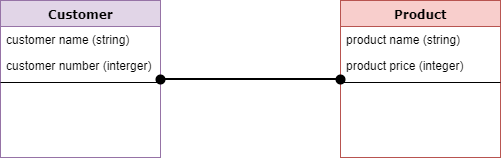
Data model example:

  • Customer and Product are two entities. Customer number and name are attributes of the Customer entity
  • Product name and price are attributes of product entity
  • Sale is the relationship between the customer and product
Conceptual Data Model

Characteristics of a conceptual data model

  • Offers Organisation-wide coverage of the business concepts.
  • This type of Data Models are designed and developed for a business audience.
  • The conceptual model is developed independently of hardware specifications like data storage capacity, location or software specifications like DBMS vendor and technology. The focus is to represent data as a user will see it in the "real world."

Conceptual data models known as Domain models create a common vocabulary for all stakeholders by establishing basic concepts and scope.

Logical Data Model

The Logical Data Model is used to define the structure of data elements and to set relationships between them. The logical data model adds further information to the conceptual data model elements. The advantage of using a Logical data model is to provide a foundation to form the base for the Physical model. However, the modeling structure remains generic.
Logical Data Model
Logical Data Model

At this Data Modeling level, no primary or secondary key is defined. At this Data modeling level, you need to verify and adjust the connector details that were set earlier for relationships.

Characteristics of a Logical data model

  • Describes data needs for a single project but could integrate with other logical data models based on the scope of the project.
  • Designed and developed independently from the DBMS.
  • Data attributes will have datatypes with exact precisions and length.
  • Normalization processes to the model is applied typically till 3NF.

Physical Data Model

A Physical Data Model describes a database-specific implementation of the data model. It offers database abstraction and helps generate the schema. This is because of the richness of meta-data offered by a Physical Data Model. The physical data model also helps in visualizing database structure by replicating database column keys, constraints, indexes, triggers, and other RDBMS features.

Physical Data Model
Physical Data Model

Characteristics of a physical data model:

  • The physical data model describes data need for a single project or application though it maybe integrated with other physical data models based on project scope.
  • Data Model contains relationships between tables that which addresses cardinality and nullability of the relationships.
  • Developed for a specific version of a DBMS, location, data storage or technology to be used in the project.
  • Columns should have exact datatypes, lengths assigned and default values.
  • Primary and Foreign keys, views, indexes, access profiles, and authorizations, etc. are defined.

Advantages and Disadvantages of Data Model:

Advantages of Data model:

  • The main goal of a designing data model is to make certain that data objects offered by the functional team are represented accurately.
  • The data model should be detailed enough to be used for building the physical database.
  • The information in the data model can be used for defining the relationship between tables, primary and foreign keys, and stored procedures.
  • Data Model helps business to communicate the within and across organizations.
  • Data model helps to documents data mappings in ETL process
  • Help to recognize correct sources of data to populate the model

Disadvantages of Data model:

  • To develop Data model one should know physical data stored characteristics.
  • This is a navigational system produces complex application development, management. Thus, it requires a knowledge of the biographical truth.
  • Even smaller change made in structure require modification in the entire application.
  • There is no set data manipulation language in DBMS.

Conclusion

  • Data modeling is the process of developing data model for the data to be stored in a Database.
  • Data Models ensure consistency in naming conventions, default values, semantics, security while ensuring quality of the data.
  • Data Model structure helps to define the relational tables, primary and foreign keys and stored procedures.
  • There are three types of conceptual, logical, and physical.
  • The main aim of conceptual model is to establish the entities, their attributes, and their relationships.
  • Logical data model defines the structure of the data elements and set the relationships between them.
  • A Physical Data Model describes the database specific implementation of the data model.
  • The main goal of a designing data model is to make certain that data objects offered by the functional team are represented accurately.
  • The biggest drawback is that even smaller change made in structure require modification in the entire application.
  • Reading this Data Modeling tutorial, you will learn from the basic concepts such as What is Data Model? Introduction to different types of Data Model, advantages, disadvantages, and data model example.

SQL Server : Difference Between DBMS & RDBMS

This article is half-done without your Comment! *** Please share your thoughts via Comment ***

DBMS or Database Management System and RDBMS or Relational Database Management system are based on the technology of storing data and using the database for data storage. A database in which both of them are tasked to manage is simply a collection of data. Data that gets stored in a database is of structured format.

This structuring layer to the data allows the database to prove useful in storing, managing, and retrieving the data when the need to do so arises. In the ancient times of computer technology, the information which was generated had to be stored and organized in a technology we rarely see these days, the technology of tapes. The one salient disadvantage of using the tape-based storage solution was the data’s inability to be reread from the need to resolve this issue, a database as born.

Database has since then proven to be an indispensable solution for all the data storage related needs. As the databases and the use of databases grew, the need for a robust way to manage databases also reared its head. Hence, the technology of both DBMS and RDBMS came into the picture.

Since both DBMS and RDBMS sounds very similar, finding the difference between DBMS and RDBMS could prove difficult for someone new into this domain. However, to fully appreciate the extent of differences between DBMS vs. RDBMS, we first need to take a closer look at both of these database management technologies.


These were some critical differences between DMBS and RDMS. In the table below, you will find a more comprehensive comparison of the two:

DBMSRDBMS
The data storage in DBMS is done in the form of a file. Tables are used to store data in RDBMS.
In DBMS, the data is stored in a navigational format or using a hierarchical arrangement.The tables which are used by RDBMS stores the data in the form of rows and columns. With the help of the column name and the row index, any information can be easily extracted.
Only one user can use DBMS.More than one user can use RDBMS.
Usually, the database may not use the ACID form of data storage, which could bring in some issues that can lead to more significant problems in the future.Because Relational Databases use the ACID model, the construction of them becomes problematic. However, this difficulty is easily countered by the benefits of using an ACID model.
This program was developed to manage the data which is stored in the computer (usually in the hard disk of a computer).This program is used to maintain the relationship of the various tables in a database.
There is not much need to have suitable hardware and software to run DMBS software properly.A good set of both hardware and software is needed to run the program of RDBMS properly.
The support of integrity constants is just not present in DBMS.RDBMS has the support for integrity constants.
The program of DMBS cannot be normalized.The program of RDBMS supports normalization.
There is no support for distributed databases in DBMS.RDBMS allows for distributed databases.
DBMS was not made to handle a huge amount of data. Whereas RDBMS can actually handle a very high amount of data.
Getting the data which is stored in a DBMS is very.Because of the relational model, the data stored in RDBMS is straightforward to access.
There is absolutely no relationship established in the data when using a DBMS model.In Relational DBMS, the data is stored, and the relationship between the information is established with foreign keys’ help.
There is a lack of security in the DBMS model of storing data, There are several log files created, which automatically increases the security of the data stored in the RDBMS model.  

Thursday, December 3, 2020

SQL Server : ODBC Scalar Functions (Transact-SQL)

This article is half-done without your Comment! *** Please share your thoughts via Comment ***

You can use ODBC Scalar Functions in Transact-SQL statements. These statements are interpreted by SQL Server. They can be used in stored procedures and user-defined functions. These include string, numeric, time, date, interval, and system functions.

Usage

syntaxsql
SELECT {fn <function_name> [ (<argument>,....n) ] }

Functions

The following tables list ODBC scalar functions that aren't duplicated in Transact-SQL.

String Functions

STRING FUNCTIONS
FunctionDescription
BIT_LENGTH( string_exp ) (ODBC 3.0)Returns the length in bits of the string expression.

Returns the internal size of the given data type, without converting string_exp to string.
CONCAT( string_exp1,string_exp2) (ODBC 1.0)Returns a character string that is the result of concatenating string_exp2 to string_exp1. The resulting string is DBMS-dependent. For example, if the column represented by string_exp1 contained a NULL value, DB2 would return NULL but SQL Server would return the non-NULL string.
OCTET_LENGTH( string_exp ) (ODBC 3.0)Returns the length in bytes of the string expression. The result is the smallest integer not less than the number of bits divided by 8.

Returns the internal size of the given data type, without converting string_exp to string.

Numeric Function

NUMERIC FUNCTION
FunctionDescription
TRUNCATE( numeric_exp, integer_exp) (ODBC 2.0)Returns numeric_exp truncated to integer_exp positions right of the decimal point. If integer_exp is negative, numeric_exp is truncated to |integer_exp| positions to the left of the decimal point.

Time, Date, and Interval Functions

TIME, DATE, AND INTERVAL FUNCTIONS
FunctionDescription
CURRENT_DATE( ) (ODBC 3.0)Returns the current date.
CURDATE( ) (ODBC 3.0)Returns the current date.
CURRENT_TIME[( time-precision )] (ODBC 3.0)Returns the current local time. The time-precision argument determines the seconds precision of the returned value
CURTIME() (ODBC 3.0)Returns the current local time.
DAYNAME( date_exp ) (ODBC 2.0)Returns a character string that contains the data-source-specific name of the day for the day part of date_exp. For example, the name is Sunday through Saturday or Sun. through Sat. for a data source that uses English. The name is Sonntag through Samstag for a data source that uses German.
DAYOFMONTH( date_exp ) (ODBC 1.0)Returns the day of the month, based on the month field in date_exp, as an integer. The return value is in the range of 1-31.
DAYOFWEEK( date_exp ) (ODBC 1.0)Returns the day of the week based on the week field in date_exp as an integer. The return value is in the range of 1-7, where 1 represents Sunday.
HOUR( time_exp ) (ODBC 1.0)Returns the hour, based on the hour field in time_exp, as an integer value in the range of 0-23.
MINUTE( time_exp ) (ODBC 1.0)Returns the minute, based on the minute field in time_exp, as an integer value in the range of 0-59.
SECOND( time_exp ) (ODBC 1.0)Returns the second, based on the second field in time_exp, as an integer value in the range of 0-59.
MONTHNAME( date_exp ) (ODBC 2.0)Returns a character string that contains the data-source-specific name of the month for the month part of date_exp. For example, the name is January through December or Jan. through Dec. for a data source that uses English. The name is Januar through Dezember for a data source that uses German.
QUARTER( date_exp ) (ODBC 1.0)Returns the quarter in date_exp as an integer value in the range of 1-4, where 1 represents January 1 through March 31.
WEEK( date_exp ) (ODBC 1.0)Returns the week of the year, based on the week field in date_exp, as an integer value in the range of 1-53.

Examples

A. Using an ODBC function in a stored procedure

The following example uses an ODBC function in a stored procedure:

SQL
CREATE PROCEDURE dbo.ODBCprocedure  
(  
    @string_exp NVARCHAR(4000)  
)  
AS  
SELECT {fn OCTET_LENGTH( @string_exp )};  

B. Using an ODBC Function in a user-defined function

The following example uses an ODBC function in a user-defined function:

SQL
CREATE FUNCTION dbo.ODBCudf  
(  
    @string_exp NVARCHAR(4000)  
)  
RETURNS INT  
AS  
BEGIN  
DECLARE @len INT  
SET @len = (SELECT {fn OCTET_LENGTH( @string_exp )})  
RETURN(@len)  
END ;  
  
SELECT dbo.ODBCudf('Returns the length.');  
--Returns 38  

C. Using an ODBC functions in SELECT statements

The following SELECT statements use ODBC functions:

SQL
DECLARE @string_exp NVARCHAR(4000) = 'Returns the length.';  
SELECT {fn BIT_LENGTH( @string_exp )};  
-- Returns 304  
SELECT {fn OCTET_LENGTH( @string_exp )};  
-- Returns 38  
  
SELECT {fn CONCAT( 'CONCAT ','returns a character string')};  
-- Returns CONCAT returns a character string  
SELECT {fn TRUNCATE( 100.123456, 4)};  
-- Returns 100.123400  
SELECT {fn CURRENT_DATE( )};  
-- Returns 2007-04-20  
SELECT {fn CURRENT_TIME(6)};  
-- Returns 10:27:11.973000  
  
DECLARE @date_exp NVARCHAR(30) = '2007-04-21 01:01:01.1234567';  
SELECT {fn DAYNAME( @date_exp )};  
-- Returns Saturday  
SELECT {fn DAYOFMONTH( @date_exp )};  
-- Returns 21  
SELECT {fn DAYOFWEEK( @date_exp )};  
-- Returns 7  
SELECT {fn HOUR( @date_exp)};  
-- Returns 1   
SELECT {fn MINUTE( @date_exp )};  
-- Returns 1  
SELECT {fn SECOND( @date_exp )};  
-- Returns 1  
SELECT {fn MONTHNAME( @date_exp )};  
-- Returns April  
SELECT {fn QUARTER( @date_exp )};  
-- Returns 2  
SELECT {fn WEEK( @date_exp )};  
-- Returns 16  

Examples: Azure Synapse Analytics and Parallel Data Warehouse

D. Using an ODBC function in a stored procedure

The following example uses an ODBC function in a stored procedure:

SQL
CREATE PROCEDURE dbo.ODBCprocedure  
(  
    @string_exp NVARCHAR(4000)  
)  
AS  
SELECT {fn BIT_LENGTH( @string_exp )};  

E. Using an ODBC Function in a user-defined function

The following example uses an ODBC function in a user-defined function:

SQL
CREATE FUNCTION dbo.ODBCudf  
(  
    @string_exp NVARCHAR(4000)  
)  
RETURNS INT  
AS  
BEGIN  
DECLARE @len INT  
SET @len = (SELECT {fn BIT_LENGTH( @string_exp )})  
RETURN(@len)  
END ;  
  
SELECT dbo.ODBCudf('Returns the length in bits.');  
--Returns 432  

F. Using an ODBC functions in SELECT statements

The following SELECT statements use ODBC functions:

SQL
DECLARE @string_exp NVARCHAR(4000) = 'Returns the length.';  
SELECT {fn BIT_LENGTH( @string_exp )};  
-- Returns 304  
  
SELECT {fn CONCAT( 'CONCAT ','returns a character string')};  
-- Returns CONCAT returns a character string  
SELECT {fn CURRENT_DATE( )};  
-- Returns today's date  
SELECT {fn CURRENT_TIME(6)};  
-- Returns the time  
  
DECLARE @date_exp NVARCHAR(30) = '2007-04-21 01:01:01.1234567';  
SELECT {fn DAYNAME( @date_exp )};  
-- Returns Saturday  
SELECT {fn DAYOFMONTH( @date_exp )};  
-- Returns 21  
SELECT {fn DAYOFWEEK( @date_exp )};  
-- Returns 7  
SELECT {fn HOUR( @date_exp)};  
-- Returns 1   
SELECT {fn MINUTE( @date_exp )};  
-- Returns 1  
SELECT {fn SECOND( @date_exp )};  
-- Returns 1  
SELECT {fn MONTHNAME( @date_exp )};  
-- Returns April  
SELECT {fn QUARTER( @date_exp )};  
-- Returns 2  
SELECT {fn WEEK( @date_exp )};  
-- Returns 16  

Featured Post

SQL Server : SELECT all columns to be good or bad in database system

This article is half-done without your Comment! *** Please share your thoughts via Comment *** In this post, I am going to write about one o...

Popular Posts